
A shopfront in North Brisbane closes for the evening. The next morning, a damaged door, missing stock and a disputed delivery leave the owner asking one question: “Do we have usable footage?” The recorder may be running, but a camera aimed too high, poor night lighting, incorrect time settings or limited retention can make that footage difficult to rely on.
That's why business CCTV installation should be treated as an evidence and compliance system, not a collection of cameras fixed to walls. The right design helps deter unauthorised access, investigate incidents and support safer operations. The wrong design can create blind spots, privacy problems and footage that doesn't answer the question being asked.
This guide is written for retailers, hospitality venues, warehouses, offices, commercial landlords and facility managers across South East Queensland. It follows the practical journey from defining the security problem through equipment selection, system design, Queensland privacy obligations, installation, commissioning and ongoing maintenance. Australian Standards, Queensland legislation, metric measurements and Australian dollar considerations all form part of that process.
Table of Contents
- Introduction to Business CCTV Installation in Queensland
- Why Your Business Needs CCTV and Whether Cameras Will Solve It
- How Commercial CCTV Systems Are Designed for Usable Evidence
- Choosing Commercial CCTV Equipment for Business Sites
- Queensland Compliance Privacy and Retention Rules for Business CCTV
- Business CCTV Installation and Commissioning Steps Explained
- Maintaining Your CCTV System and Getting Local Support in SE Queensland
Introduction to Business CCTV Installation in Queensland
A break-in is often the moment a business owner realises CCTV is more than a deterrent. Staff may remember seeing a vehicle near the loading area, a customer may dispute an incident at the counter, or a contractor may report damage after hours. Without a clear image, accurate timestamp and reliable export process, the business is left with assumptions rather than evidence.
Commercial CCTV can serve three different purposes. It can discourage unwanted behaviour, record events for later investigation and provide operational oversight around entrances, tills, loading zones and restricted areas. Those purposes overlap, but they don't always require the same camera, lens, lighting or recording approach.
Practical rule: Decide what the system must prove before deciding what equipment to buy.
Queensland businesses also operate within a recognised technical framework. Standards Australia's AS 4806.2-2006 guidance covers the selection, planning and installation of CCTV systems for security and surveillance applications, while the later AS/NZS 62676 series continued that standards pathway into the digital era. The point is simple: a commercial system shouldn't be designed by guessing where cameras look useful. It should be planned around coverage, identification, recording and management.
The market has expanded well beyond occasional camera installations. One Australian market estimate values the CCTV market at USD 1.4 billion in 2025 and projects USD 6.2 billion by 2034, with a projected 17.35% CAGR from 2026 to 2034. These are market estimates, not a promise about any individual business, but they show how CCTV has become mainstream infrastructure for retail, warehousing, hospitality and office properties. The Australian commercial CCTV market context is outlined here.
A useful project starts with a site walk-through, not a catalogue. The installer should understand how people, vehicles, stock and contractors move through the property, then connect those movements to evidence requirements, privacy controls, storage and maintenance.
Why Your Business Needs CCTV and Whether Cameras Will Solve It
Many businesses begin with hardware. They ask for high-resolution cameras, remote viewing and a large recorder before identifying the problem those features are meant to solve. That approach can produce an expensive system that records plenty of activity but fails to capture a face, a number plate, a loading-bay handover or the moment a restricted door opened.
Queensland's Office of the Information Commissioner recommends starting with the business case. Ask whether there's a clearly stated purpose, whether cameras will achieve it, whether live monitoring could replace recording and whether a Privacy Impact Assessment may be needed. The Queensland OIC guidance on privacy and surveillance technology is particularly relevant as businesses consider AI-enabled monitoring, facial recognition and workplace surveillance.
Treat CCTV like a witness. A witness needs a clear brief. “Watch everything” is not a useful instruction, while “capture a clear view of everyone entering the stockroom after hours” gives the designer something practical to work with.
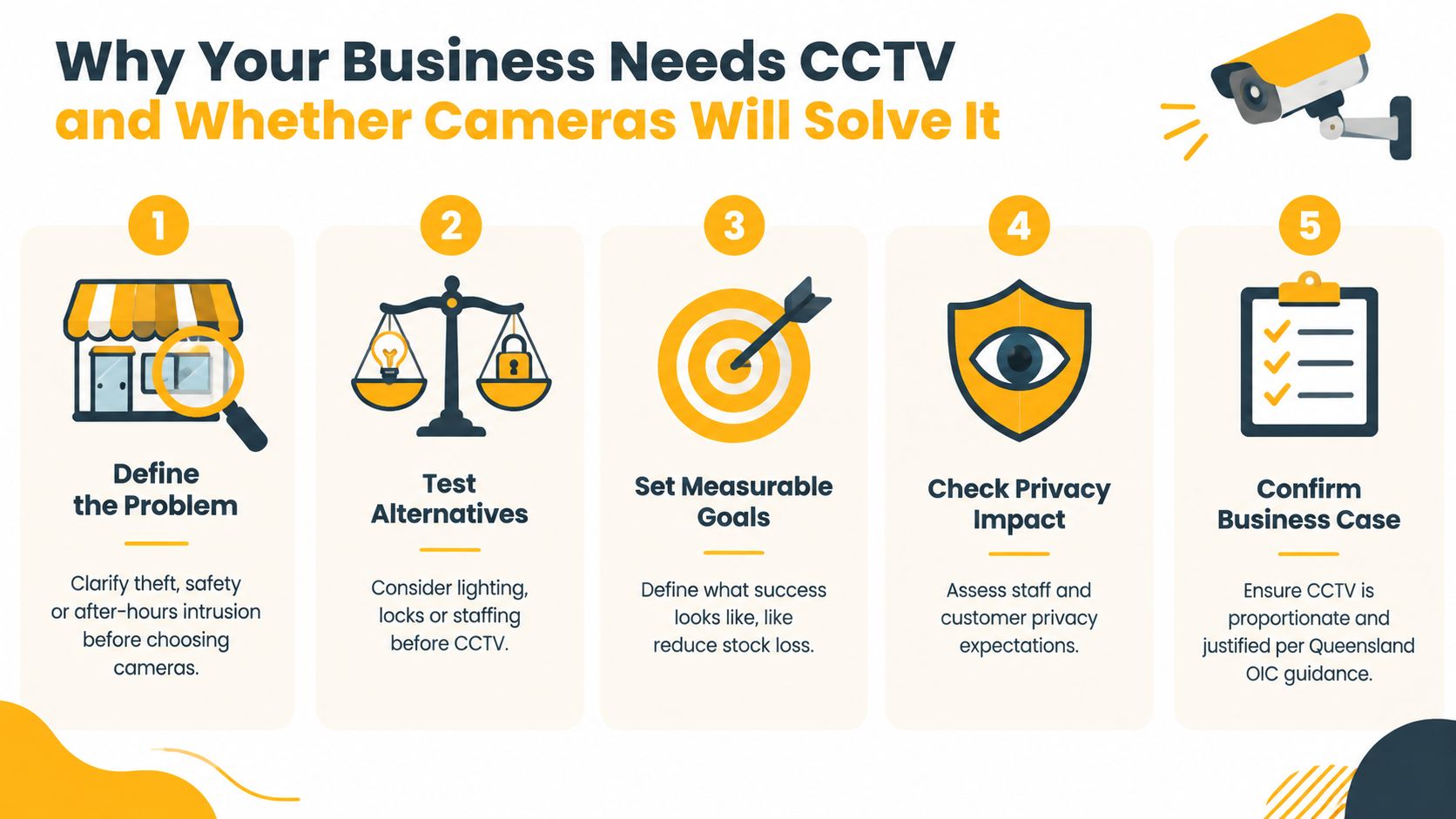
Start with the business problem
A useful purpose statement might focus on:
- After-hours intrusion: Identify movement around rear doors, gates or storage areas when the site is closed.
- Theft and stock loss: Capture activity at tills, displays, dispatch points or staff-only areas.
- Safety and incident review: Establish what happened during an argument, fall, injury or property-damage event.
- Access accountability: Confirm who entered a restricted room and when.
- Operational oversight: Review deliveries, contractor access or vehicle movements without relying only on memory.
Before adding cameras, consider whether improved lighting, stronger locks, access control, staff procedures or live monitoring would address the risk more directly. Sometimes fewer cameras with better placement will produce more useful evidence than a large number of poorly positioned views.
Set a practical success test. You might need to identify a person entering a door, understand the sequence of an incident or retrieve a clip for an authorised investigation. If the intended outcome isn't clear, the system can't be specified properly, and privacy intrusion may become disproportionate to the business need.
How Commercial CCTV Systems Are Designed for Usable Evidence
A camera can record video without recording useful evidence. Design quality depends on what the image needs to show, where the subject will be, how light changes during the day and how quickly staff can retrieve the relevant footage.
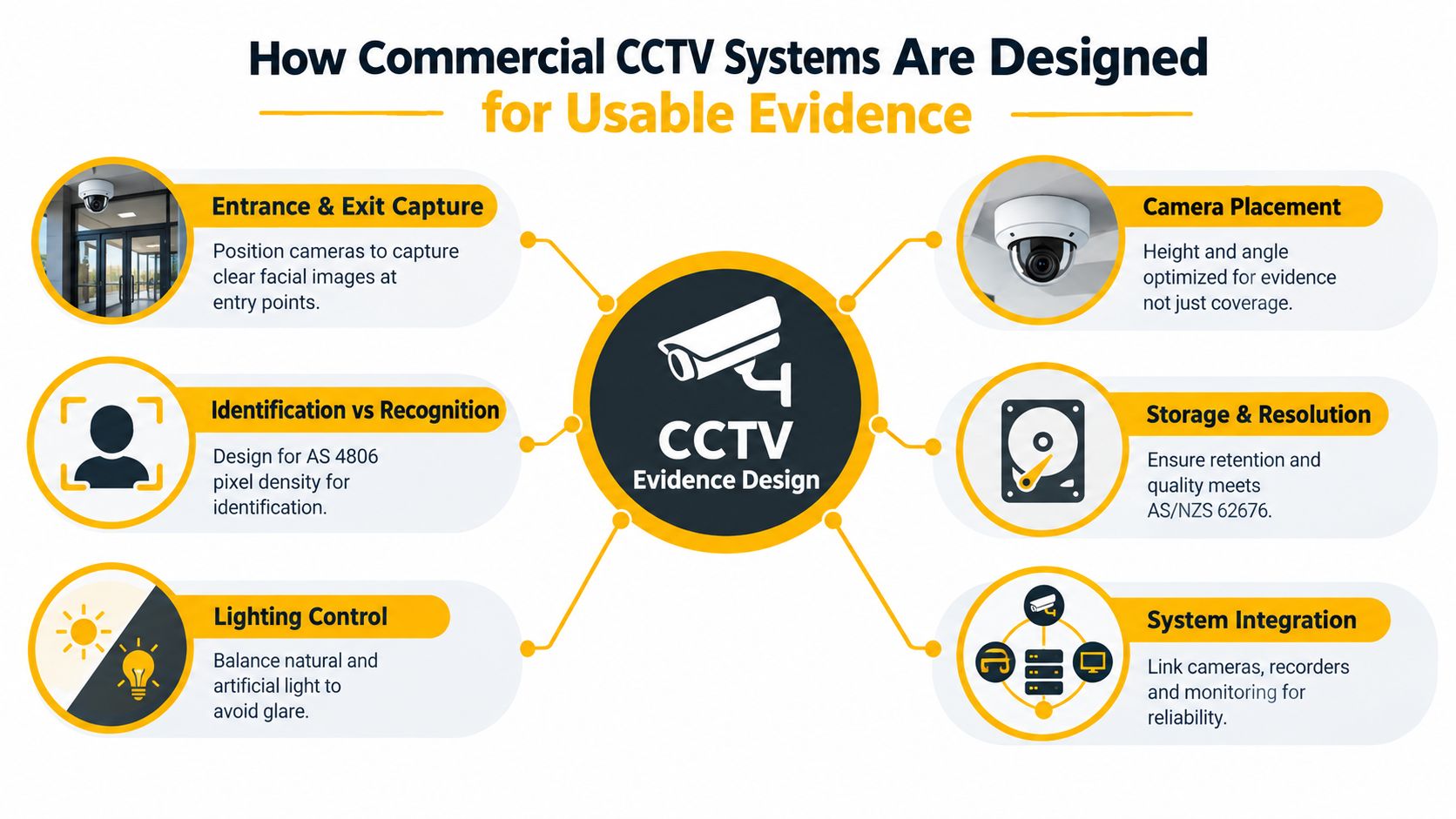
The AS 4806 and AS/NZS 62676 family provides a recognised basis for commercial surveillance planning in Australia. Commercial CCTV guidance based on AS 4806 emphasises the difference between viewing an area and achieving image quality suitable for identification and review.
Build coverage in layers
Start at the outside and work towards the assets that matter most. A warehouse may need an overview of the driveway, a clear view of the entry gate, identification coverage at personnel doors and a separate view of high-value storage. A retail shop may need a wide view of the sales floor, but the entrance and point of sale often need more deliberate positioning.
Key design questions include:
- Where must a person be identified? Entrances and exits usually deserve priority because people pass through defined points.
- Where is recognition enough? A broad yard view may show movement and direction, but it may not identify a person.
- What lighting will the camera face? Glare from a roller door, bright Queensland sunlight or a dark rear lane can reduce image usefulness.
- What angle supports evidence? A camera mounted too high may show the top of a person's head instead of useful facial detail.
- How will footage be retrieved? Recording infrastructure, time synchronisation, user permissions and export procedures matter as much as the camera.
- What happens when equipment fails? Network, power, recorder and storage planning should support reliability and maintenance.
A coverage map should show camera position, direction, intended purpose and any known obstruction. It should also identify cable routes, network points, power requirements, recorder location and access restrictions. This prevents a common mistake, where the installer fits cameras first and discovers later that a sun-facing lens, sign, shelving unit or roller door blocks the critical view.
Design for review, not just live viewing
Live screens can look impressive while providing little value during an incident. The more important test is whether an authorised user can locate the right date and time, review the event without confusion and export footage in a usable format.
Evidence is a chain, not a single image. The scene, timestamp, camera identity, storage process and access record should all support the incident review.
Ask the designer to explain which cameras are intended for overview, recognition or identification. Ask how lighting has been tested, how storage has been sized and how the business will manage passwords, exports and maintenance after handover.
Choosing Commercial CCTV Equipment for Business Sites
Equipment should follow the design brief. A retail entrance, a warehouse yard and an office corridor have different lighting, distances, viewing angles and privacy considerations, so the same camera package won't suit all three.
Australia's formal CCTV standards pathway includes AS 4806.2-2006 and the later AS/NZS 62676 series, which gives commercial buyers a useful reference point when comparing systems. A separate guide to CCTV installation cost can help frame budget discussions, but price should be assessed against evidence quality, retention, installation complexity and support.
Match the equipment to the site
A fixed dome or turret camera can suit an indoor entrance or retail floor where a discreet, stable view is required. A bullet camera may suit an external wall or driveway where a longer viewing direction and visible deterrence are useful. Pan, tilt and zoom equipment can provide flexibility, but it shouldn't replace careful placement at a point where identification is essential.
Resolution alone doesn't guarantee a useful image. Lens selection, distance, field of view, lighting and camera height all affect whether a face or activity is clear. A wide-angle lens may cover more floor area but show less detail on a person standing near the far edge. A narrower lens may provide stronger detail but leave more of the surrounding area outside the frame.
Low-light performance also needs practical testing. Infrared can support night viewing, but reflective surfaces, glass, rain and nearby lighting can affect the result. Ask to see how the proposed camera performs at the actual entrance, car park, loading bay or rear lane rather than relying only on a daytime demonstration.
| Equipment option | Best for | Key trade-off |
|---|---|---|
| Fixed dome or turret camera | Retail floors, offices and indoor access points | Stable coverage, but limited flexibility after installation |
| Bullet camera | External walls, driveways and defined approaches | Visible deterrence, but placement can be more exposed |
| Pan, tilt and zoom camera | Areas requiring operator-directed views | Greater flexibility, but it may not continuously cover every direction |
| Network video recorder | Central recording and local review | Provides control over storage, but requires secure installation and maintenance |
| RAID storage | Sites where storage resilience matters | Can support continuity, but adds cost and configuration requirements |
| Remote access platform | Owners and managers needing off-site review | Convenient access, but requires strong account controls and a clear privacy process |
Make storage part of the purchase decision
Retention depends on camera count, recording settings, scene activity, image quality and the period the business needs to keep footage. A system designed for short routine review may not suit a licensed venue or a business that must preserve incident footage for later investigation.
Cabling and network capacity also deserve attention. Poorly routed cable, unprotected external runs or an overloaded network can undermine an otherwise capable camera system. Remote access should be limited to authorised users, protected by individual accounts and reviewed when staff or contractors leave.
Choose equipment as a complete system. Camera, lens, lighting, recorder, storage, network, software, access controls and maintenance must work together.
Queensland Compliance Privacy and Retention Rules for Business CCTV
Queensland CCTV compliance doesn't stop at camera placement. It includes where cameras point, whether they capture audio, who can view footage, how long recordings remain available and how the business responds to requests or incidents.
Section 227A of the Queensland Criminal Code makes it an offence to record video of people without consent in places where they reasonably expect privacy, such as a changeroom. Queensland Government privacy guidance for businesses also notes that body corporate approval may be required for exterior cameras. If a camera captures sound, the Invasion of Privacy Act 1971 may apply.
Keep privacy controls practical
A camera should point only where it has a justified business purpose. Toilets, changerooms and similar private areas are not suitable surveillance locations. A camera positioned near a staff area may also capture more personal activity than intended, so masking, restricted angles or a different location may be appropriate.
Clear signage should tell people that CCTV operates on the premises. Where the business is covered by the Privacy Act 1988 and the Australian Privacy Principles, its privacy notice and handling procedures should reflect the surveillance activity. Audio deserves separate scrutiny. If sound isn't necessary, disabling audio may reduce legal and privacy risk.
The OIC's business-case approach is useful here. The business should be able to explain why surveillance is needed, why the selected coverage is proportionate and how footage will be protected. AI features require extra care because analytics can change a basic recording system into a tool for detection, classification or workplace oversight.
Design retention and access together
Queensland Government guidance for licensed venues provides a concrete example of the controls a commercial CCTV system may need. It requires timestamped recordings, digital export capability, daily equipment checks, six-monthly certification by a suitably qualified person, secure storage and a minimum 28-day retention period for routine footage. Incident footage may need to be kept for at least 1 year after the retention window. These requirements are set out in the Queensland Government CCTV legislation guidance for licensed venues.
That retention period affects recorder capacity, storage configuration, backup decisions and maintenance records. It also means a business needs an incident hold process, so relevant footage isn't automatically overwritten.
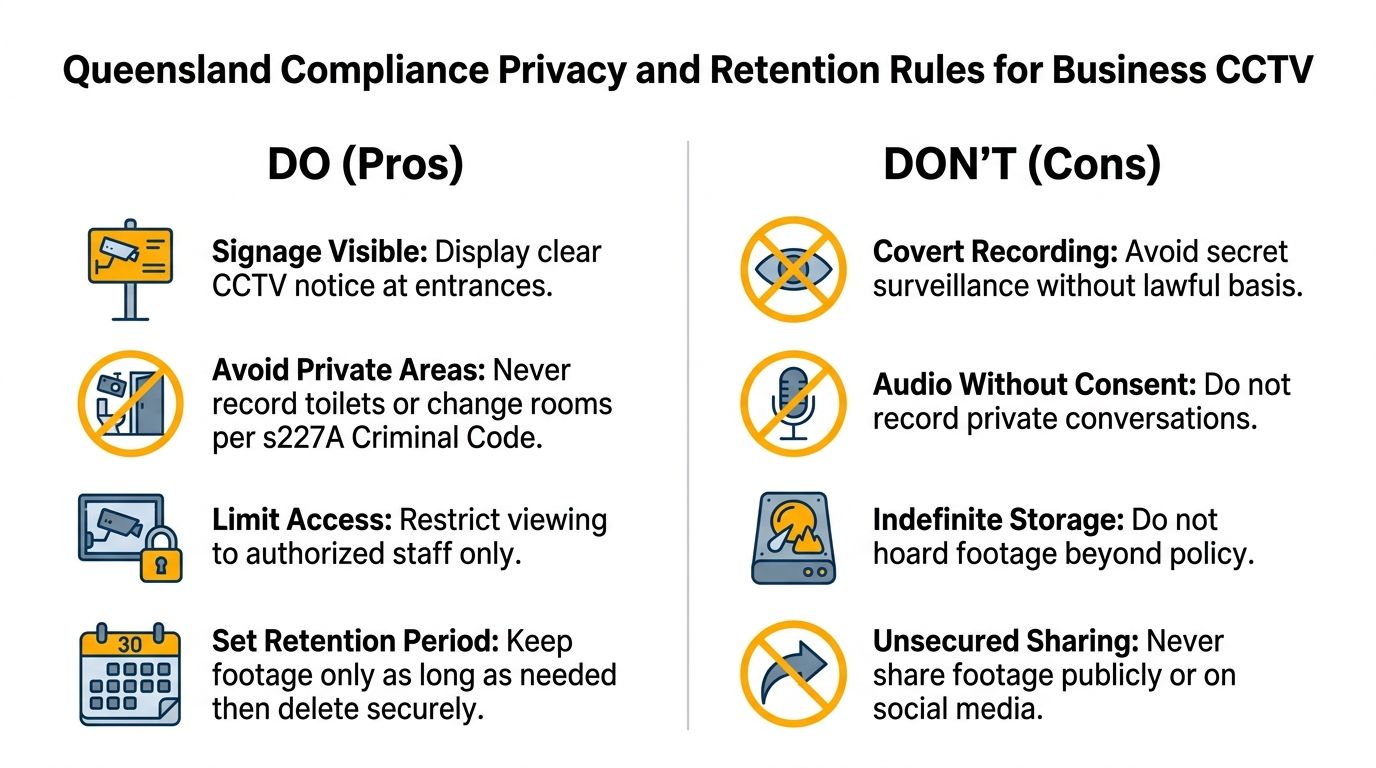
Limit access to people who need it for a defined role. Keep an export record, store copies securely and avoid sharing footage publicly or through social media. Privacy compliance is part of system design, not a sign added after installation.
Business CCTV Installation and Commissioning Steps Explained
Professional installation should feel like a controlled building handover. The installer isn't finished when every camera appears on a monitor. The project is complete when the system has been tested, documented and explained to the people responsible for using it.
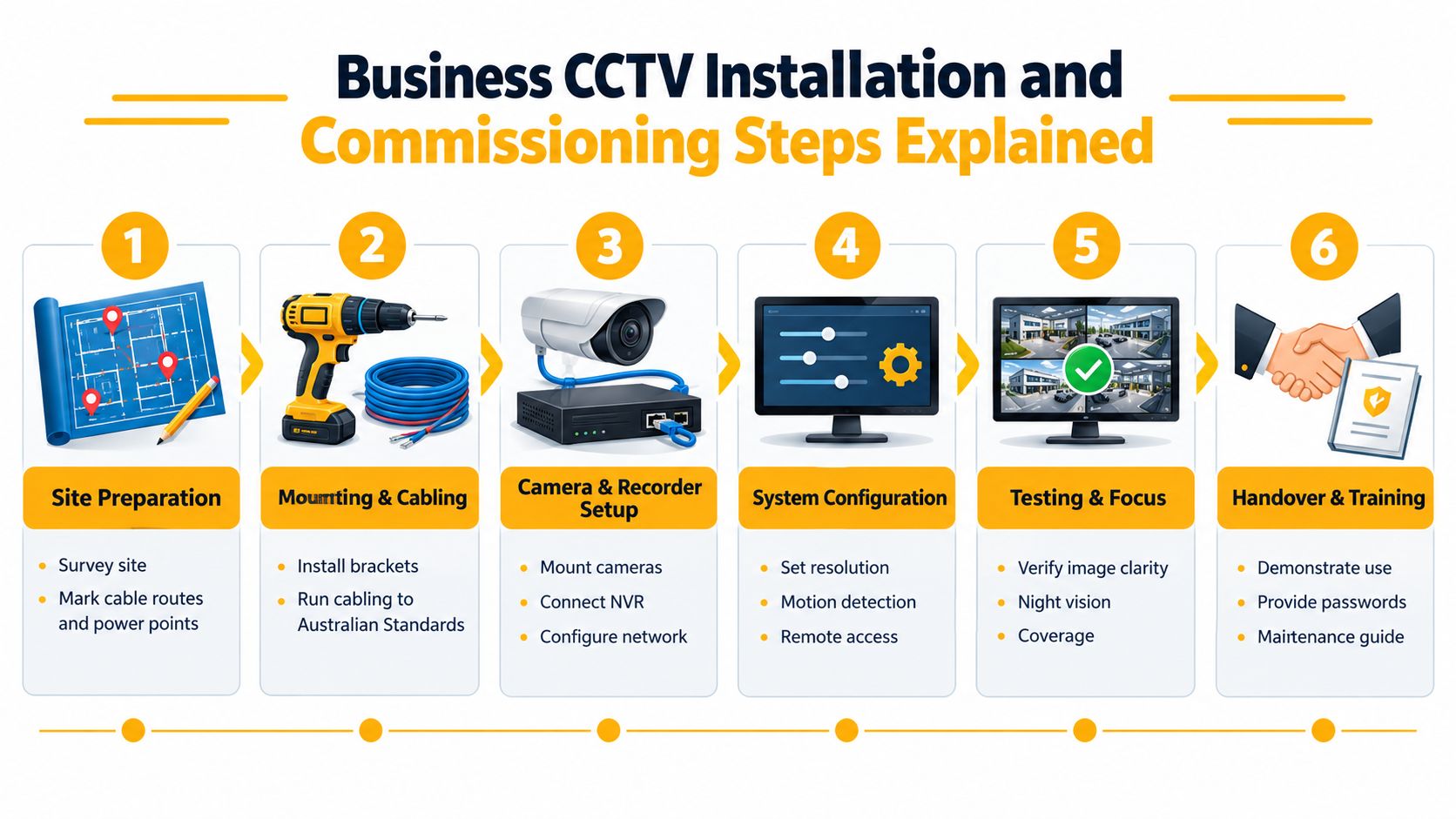
The installation sequence
Site preparation begins with a survey of mounting surfaces, cable routes, network points, power requirements and recorder location. In a busy commercial property, the work plan should account for trading hours, customer movement, access equipment and protection of existing services.
Mounting and cabling follow the approved design. Cameras need stable brackets, suitable weather protection where required and cable routes that reduce damage risk. Electrical and security work should be coordinated under the relevant current licences and Australian requirements.
Camera and recorder setup connects each camera to the recording system and network. The installer should label equipment clearly, configure camera names and confirm that every view corresponds with the coverage plan.
Configuration includes resolution, recording mode, motion settings, user accounts, remote access and time synchronisation. Incorrect timestamps can make an otherwise useful clip difficult to correlate with alarms, access logs or staff reports.
Commission before signing off
Testing should take place in the conditions that matter. Check daytime and low-light images, entrance identification, loading areas, glare, obstructions, recording continuity, playback, export and remote access. Confirm that user permissions work and that unauthorised accounts can't view footage.
A commissioning test should answer one question: Can the business retrieve clear, correctly timed evidence when an incident occurs?
The handover should include a camera schedule, system diagram, user instructions, account details, maintenance information and any certification required for the site. Staff don't need a technical lecture, but authorised users should know how to search, export, protect footage and report faults.
CCTV can also sit alongside a broader commercial security alarm system. The two systems serve different functions, so integration should be planned around the business response rather than added as an afterthought.
Maintaining Your CCTV System and Getting Local Support in SE Queensland
A CCTV system can gradually become unreliable without looking obviously broken. A dirty lens, failed infrared light, full or unhealthy storage, changed lighting, moved shelving or an expired user account may only be discovered when someone needs footage urgently.
Maintenance should include visual checks, lens cleaning, cable and bracket inspection, storage-health review, firmware management, time verification, playback testing and retention audits. Licensed venues may also need the operational checks and certification described in the Queensland guidance above. Incident retrieval drills are valuable because they test the complete process, not just whether a camera is online.
Business operations change. A new roller door, shop layout, tenancy, delivery route or staff entrance can create a blind spot or alter a privacy risk. Review the camera map when the property changes, and update user permissions when managers, contractors or service providers leave.
South East Queensland sites often need responsive support across different operating environments, from North Brisbane and Moreton Bay to the Sunshine Coast, Somerset and Ipswich. A local provider can coordinate site visits, maintenance records and compliance reporting without treating every fault as a remote software issue. With 1,763 security system installation and monitoring businesses in 2026, up 2.7% from 2025, the Australian market is crowded, so documentation and ongoing service deserve as much attention as the initial equipment choice. Queensland security provider support and services can be assessed alongside licensing, service coverage and maintenance capability.
Celtic Fire & Security supplies, installs, configures, tests and maintains commercial CCTV, alarms, fire protection and locksmith services across SE Queensland. Visit Celtic Fire & Security to arrange a site assessment, review your evidence and privacy requirements, and plan a CCTV system that can be maintained after handover.
No responses yet