
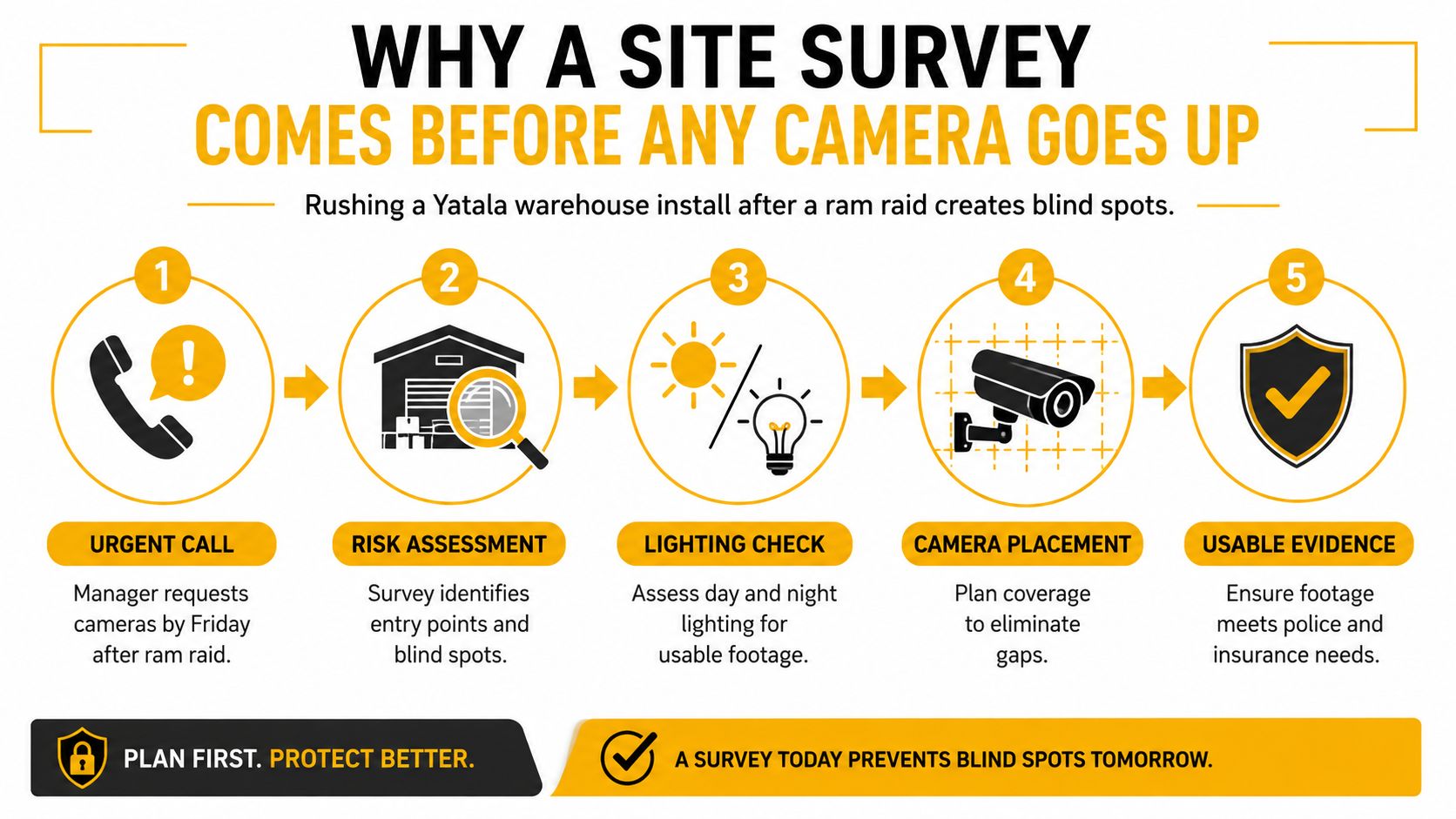
A Yatala warehouse manager calls after a ram raid. They want cameras installed by Friday, preferably on the existing network, and they expect the quote to be based on the number of cameras rather than the building itself. That urgency is understandable, but a rushed commercial CCTV camera installation can leave the roller door covered while missing the approach lane, produce glare instead of a face, or record footage nobody can export when an insurer or police officer asks for it.
A reliable system starts before anyone drills a wall. In Queensland, the design also needs to account for security equipment installer licensing, AS 62676, AS 3000, structured cabling, privacy obligations, signage, access controls and maintainable handover documentation. The hardware matters, but the decisions around it determine whether the system remains useful after the installation crew leaves.
Table of Contents
- Why a Site Survey Comes Before Any Camera Goes Up
- Designing Coverage Zones and the Network Around Them
- Choosing Cameras, Recorders and Cabling for the Site
- Installing Cabling, Power and the Security Network
- Commissioning and Testing for Evidentiary Usefulness
- Queensland Licensing, Privacy and the Handover Pack
- Choosing the Right Commercial CCTV Installer
Why a Site Survey Comes Before Any Camera Goes Up
The first visit shouldn't be a quick count of doors and corners. A technician needs to walk the site as though an incident has already happened, then work backwards to determine what footage would have been useful.
At a warehouse, that means checking vehicle and pedestrian approaches, main entries, emergency exits, roller door heights, loading docks, dispatch benches, cash handling areas, staff entrances and restricted rooms. In a retail shop, the priorities may shift towards the point of sale, customer approaches, stockrooms and rear access. An office may require a different balance between reception, server rooms, lift lobbies and after-hours access.
Night conditions often change the design. A camera that looks excellent during a Queensland afternoon can lose facial detail when a vehicle headlight enters the scene or when an external floodlight reflects from a polished floor. The survey should record lighting at operating hours, not just during a convenient daytime appointment.
Questions that alter the design
A useful survey includes conversations with the people who understand the risk:
- Insurance conditions: Confirm whether the insurer specifies monitored areas, recording expectations, image quality or maintenance evidence.
- Incident history: Ask where theft, unauthorised access, disputes or safety events have occurred.
- Operating hours: Separate public trading, deliveries, cleaning, shift changes and unattended periods.
- Footage responsibility: Establish who reviews recordings, who can export clips and who approves access to sensitive footage.
- Building constraints: Inspect existing conduit, ceiling voids, cable trays, roof access, racking and safe mounting points.
The survey notes then support the design rationale under the AS/IEC 62676 family, while electrical constraints are identified early against AS 3000 requirements. Shared circuits, congested cable trays, inaccessible racking and unsuitable mounting surfaces are cheaper to solve on paper than after installation.
Practical rule: A camera count is not a design. The design is the documented reason each camera exists, what it must show and how the system will deliver that evidence.
The proper output is a marked floor plan, camera schedule, cable schedule and written scope. That gives the client something meaningful to price against, and it gives the installer a defensible basis for selecting lenses, cable paths, switches, recording capacity and testing requirements.
Designing Coverage Zones and the Network Around Them
Coverage should be drawn as zones before equipment is selected. Start with the areas where an incident must be understood, then assign the level of detail required.
Typical zones include:
- Identification zones: Entry faces, cash handling positions and controlled doors where the system must capture distinguishing detail.
- Recognition zones: Loading docks, staff approaches and vehicle movement areas where a known person or object needs to be recognised.
- Observation zones: Warehouses, car parks and general circulation areas where the purpose is to understand movement and activity.
The AS/IEC 62676 design logic uses pixel density as a way to describe image usefulness. A practical schedule may specify 250 pixels per metre for identification, 125 pixels per metre for recognition and 62 pixels per metre for general observation, as outlined in the Australian industry guidance on AS 4806 and commercial CCTV design. Those targets aren't interchangeable. A wide warehouse view may be suitable for observation but completely unsuitable for identifying a person at a distant doorway.
Build the network beside the camera plan
Once zones are marked, validate every cable path. Check ceiling voids, structural beams, fire-rated penetrations, existing trays, lift shafts, roof access and the location of the nearest communications room. A camera plan that looks tidy on a floor drawing can become expensive when the only practical route crosses a concrete structure or exceeds the copper distance limit.
The security network should be designed separately from ordinary business traffic. Use a dedicated, PoE-capable security VLAN, then confirm:
- The switch has enough ports for the planned cameras and future service work.
- The PoE budget supports startup and operating demand, including cameras with infrared lighting or moving components.
- Uplinks can carry the required camera streams without congesting other services.
- The recorder can ingest and write the streams reliably.
- Remote access is restricted to approved users and controlled by the nominated custodian.
Zone priority should influence frame rate, bitrate and retention settings. A cash desk and a general storeroom don't need identical treatment, and applying the highest setting everywhere can consume storage without improving the evidence that matters.
Lighting and lens selection must be assessed together. A lens that frames the right doorway in daylight may need a different angle, wider dynamic range or low-light capability when the scene changes after dark. For businesses also reviewing alarm coverage, a coordinated commercial security alarm system can reduce duplicated detection gaps, but the camera still needs its own visual purpose.
Pixel Density Targets by Zone (AS/IEC 62676)
| Zone | Activity | Pixels per metre |
|---|---|---|
| Identification | Faces, cash handling, controlled entry | 250 |
| Recognition | Loading docks, staff approaches, vehicle movement | 125 |
| General observation | Warehouses, car parks, circulation | 62 |
Choosing Cameras, Recorders and Cabling for the Site
Camera selection should follow the scene, not the largest resolution printed on a brochure. A turret is often practical indoors and under eaves because it can be aimed without the appearance of a large protruding body. A dome can suit public-facing areas where the lens needs some protection from casual interference. A bullet can provide a visible deterrent along an approach or perimeter, while a multi-sensor camera can cover several directions from one mounting point where the structure and viewing angles support it.
Housing ratings need to match exposure. IP66 is appropriate for many external or wash-down locations when the complete installation, including glands and mounting, maintains the protection. IK10 is relevant where equipment may be reachable and needs resistance to impact. Neither rating fixes poor placement, exposed connectors or a bracket that flexes in wind.
Resolution isn't the whole picture
For ordinary coverage, 4MP is often a sensible balance between detail, bandwidth and storage. 8MP can be justified where identification matters, but it also demands a stronger network and more recording capacity. In mixed Queensland lighting, wide dynamic range, sensor performance and low-light sensitivity can deliver more usable footage than raw megapixels alone.
Recorder choice follows the site and the operating model. An embedded NVR is straightforward for a contained deployment, while a server-based VMS can offer broader user management, integrations and multi-site control. RAID may protect availability when a drive fails, but it isn't a substitute for an export process, access control or an agreed retention policy. Storage planning links bitrate, retention days and disk capacity, so those settings should be written into the scope rather than left to factory defaults.
ONVIF-compatible, non-proprietary equipment can make future maintenance and handover easier. NSW government technical requirements illustrate the procurement direction, including ONVIF compatibility, minimum performance specifications, 6MP resolution, IP66 external protection and IK10 vandal resistance in relevant applications, as described in the NSW government CCTV technical requirements.
Camera and Cabling Selection by Environment
| Environment | Camera type | Housing | Cable |
|---|---|---|---|
| Office interior | Turret or dome | Indoor-rated | Solid copper Cat6 |
| Retail entrance | Dome or turret with WDR | Impact-resistant where reachable | Solid copper Cat6 |
| External loading dock | Bullet or turret | IP66, IK10 where exposed | Outdoor-rated Cat6 |
| Wash-down area | Sealed turret or bullet | IP66 | Outdoor-rated Cat6 |
| Inter-building link | Fixed camera or multi-sensor | Site-specific external rating | Fibre |
Use solid copper Cat6 for runs under 90 m, Cat6A where 10 Gb uplinks are planned, and fibre between buildings or where copper distances and electrical conditions make it the safer option. Cable sold with ambiguous construction or aliased copper can create PoE dropouts, particularly when a system is under load or operating after dark.
Installing Cabling, Power and the Security Network
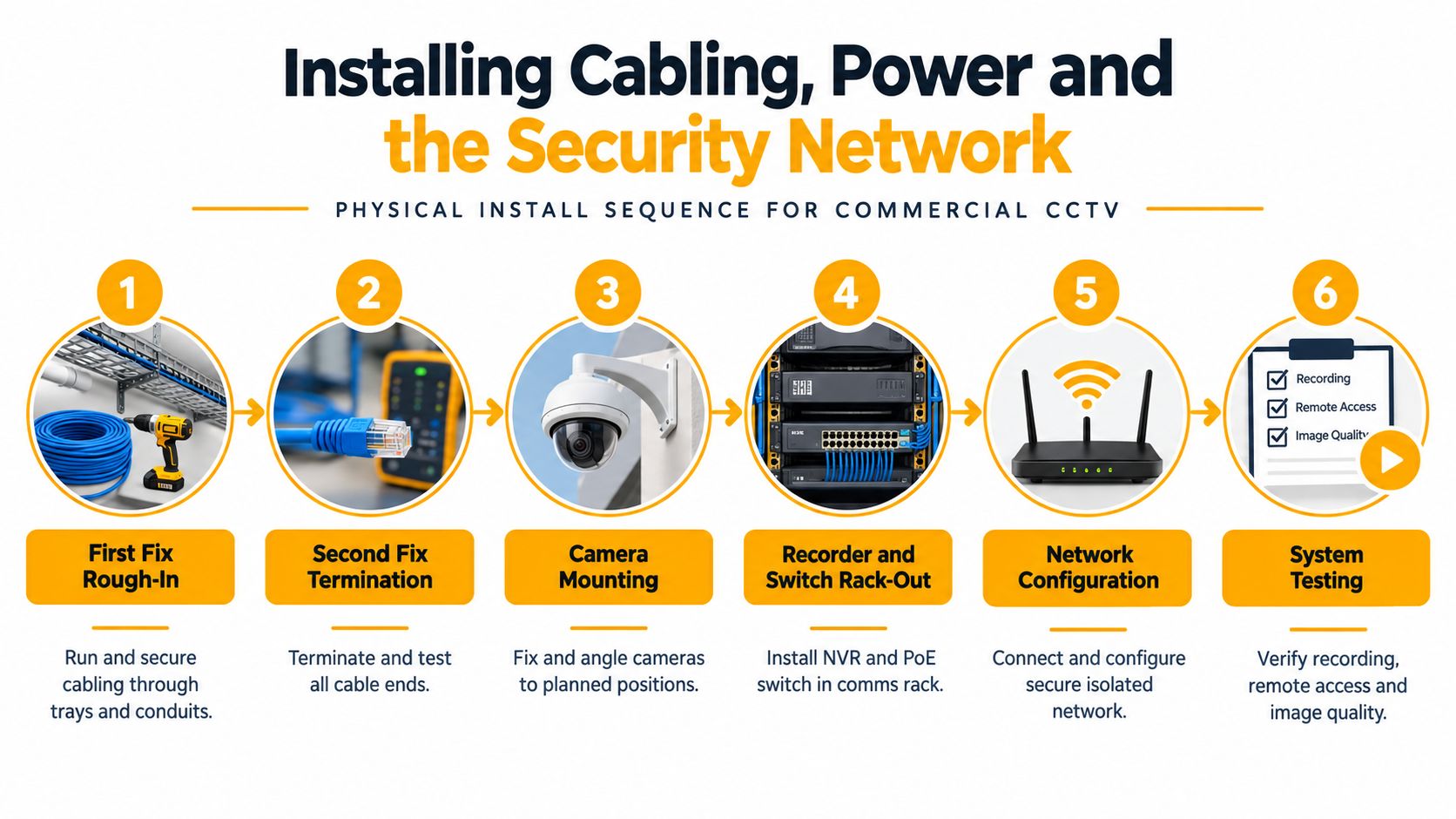
A clean installation follows a physical sequence. First fix is the rough-in, where cables are routed through trays, ceiling spaces and conduits. Second fix is termination and testing, followed by camera mounting, rack installation, network configuration and system testing.
Rough-in decisions that prevent future faults
Run solid-core Cat6 or Cat6A with proper support and bend control. Keep security traffic on a dedicated VLAN rather than placing cameras, recorders and access doors directly on the corporate LAN. Segmentation limits the effect of a compromised device and gives the business network team a clearer boundary to manage.
The 90 m horizontal copper limit is a practical design boundary before a telecommunications-room handoff, fibre uplink or PoE extender is needed. If a distant camera sits beyond that path, options include:
- PoE extension: A suitable midspan injector or extender can solve a modest distance problem where the power and data budget remains appropriate.
- Fibre conversion: Fibre is better for inter-building links and electrically challenging routes, with local equipment at the remote end.
- Local low-voltage supply: A local power arrangement may be suitable where network distance and site conditions support it.
Retrofitted buildings bring obstacles. Shared trays with mains cabling require appropriate separation under AS 3000, outdoor runs need UV-suitable jackets, and concrete penetrations require the right conduit and sealing. Label both ends of every cable, record the switch port and keep patching organised. That small discipline saves hours when a camera fails months later.
Finishing details matter
Use surge protection where the site exposure warrants it, fit IP66 glands on external entries and seal penetrations properly. A rack with labelled patch leads, documented ports and adequate access can be serviced without disturbing unrelated equipment. A bundle of unmarked cables and loose power supplies may work on handover day, but it turns routine maintenance into fault-finding.
The following visual sequence reflects the order used on a practical commercial installation.
Commissioning and Testing for Evidentiary Usefulness
A live image on an NVR screen doesn't prove that a system is fit for purpose. Commissioning should test the scene the way the business will experience it, including changing daylight, glare, shadows, vehicle headlights and after-dark activity.
During the day, verify each field of view against the marked plan. Check that the working distance is in focus, the camera isn't aimed too high, and the exposure handles both bright loading-dock conditions and darker corners. Motion and analytics zones should follow the actual scene, avoiding irrelevant movement from trees, roads or reflective surfaces.
Night testing exposes weak designs
After dark, inspect infrared range, low-light noise and facial detail at the expected target distance. White-light cameras can help in some areas, but they may alter behaviour and create glare if poorly positioned. IR-cut operation, reflections from nearby walls and overexposure on pale surfaces deserve particular attention.
Time synchronisation is another commissioning task, not an IT afterthought. Cameras and the recorder need consistent timestamps so an exported clip can be understood alongside access logs, alarm events or transaction records. The installer should also export a test recording and confirm that playback, file integrity and authorised access work as intended.
Evidence test: For every critical zone, ask whether the footage identifies a face, reads a number plate, recognises a person or only confirms that a shape moved through the scene.
A camera can provide broad situational awareness without providing evidence. Correcting the lens, mounting height, angle or scene exposure during commissioning is far less disruptive than discovering after an incident that the subject is too small or backlit.
Evidentiary Usefulness Test by Zone
| Zone Type | Target Detail | Recommended Setup |
|---|---|---|
| Entry door | Face and direction of travel | Controlled field of view, suitable focal length and WDR |
| Cash handling area | Person, hands and transaction context | Close coverage with stable exposure and secure access |
| Vehicle approach | Driver or number plate where required | Dedicated angle, tested lighting and suitable lens |
| Loading dock | People, vehicles and movement | Recognition-focused coverage with night testing |
| Warehouse aisle | Activity and route | Observation coverage with carefully placed motion zones |
Retention and bitrate settings should match the agreed schedule, while storage health should be checked before sign-off. Businesses that also manage property incidents may need the same discipline when coordinating building insurance repairs, because footage is only useful if it can be located, exported and explained.
Queensland Licensing, Privacy and the Handover Pack
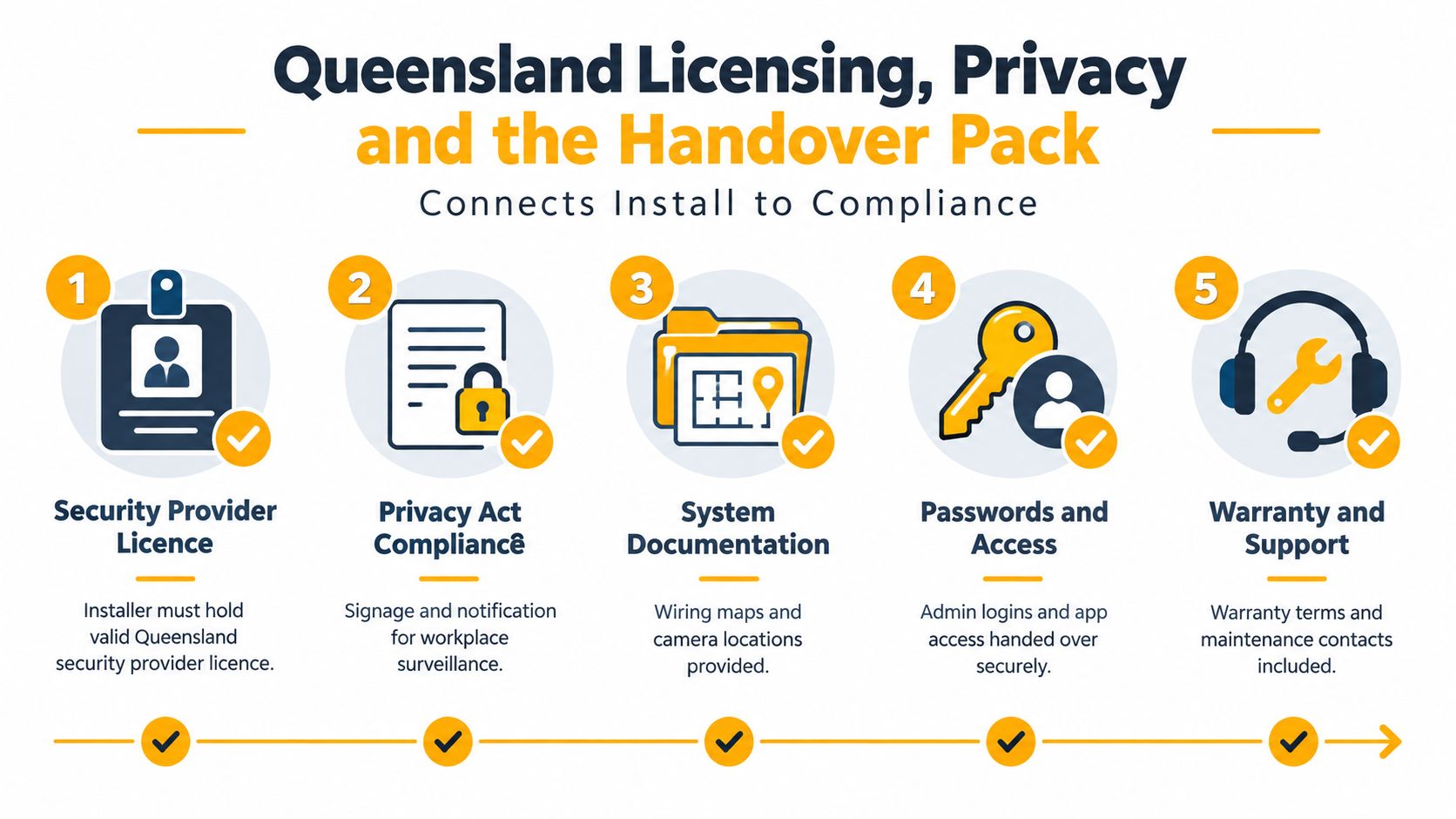
Queensland treats paid CCTV installation as regulated security work. Anyone installing CCTV for payment needs the relevant security equipment installer licence under the Queensland security licensing framework, as set out by the Queensland security equipment installer licence pathway. Electrical work and cabling can involve separate licensing and registration requirements, so a client shouldn't assume that a person who can mount a camera is authorised to complete every part of the installation.
Queensland guidance also connects surveillance to purpose and privacy. Camera collection should serve a defined business need, use appropriate signage near fixed cameras, limit access, maintain audit controls and protect monitoring rooms and recordings. A Privacy Impact Assessment may be appropriate before use, particularly where cameras capture employees, customers or passersby, as described in the Queensland camera surveillance and privacy guidance.
Treat handover as part of the installation
The handover pack should let a nominated custodian operate, audit and maintain the system without relying on a technician's memory.
- As-built records: Include camera locations, cable routes, labels, switch ports and recorder details.
- Access register: Hand over administrator credentials securely, identify approved users and record who can export footage.
- Privacy map: Mark signage locations against the camera coverage and document the surveillance purpose.
- Retention schedule: Write the agreed retention period into the system documentation, with a process for preserving footage linked to an incident.
- Maintenance plan: Schedule lens cleaning, firmware review, time checks, storage health checks and functional testing at the required interval.
Licensed venues have specific maintenance obligations. Queensland Business guidance says CCTV equipment must be maintained by an appropriately qualified person, and liquor venues require checks and certification at least every 6 months by a holder of a security equipment installer licence, according to the Queensland CCTV maintenance requirements.
The Queensland education guidance also identifies AS 62676 and AS 3000 alongside current electrical contractor licensing, security provider licensing, cabler registration and technical certification, as outlined in the Queensland electronic security guidelines. That combination is why the handover pack matters to an insurer, auditor or lawyer. It shows what was installed, why it was installed, who can access it and how the business keeps it operational.
Choosing the Right Commercial CCTV Installer
The cheapest quote often becomes expensive when it excludes design, testing, documentation, privacy signage or ongoing maintenance. A capable Queensland installer should quote against the site conditions and relevant Australian standards, not copy a competitor's camera list.
Ask for evidence before accepting the proposal:
- Licence status: Verify the current Queensland security provider and security equipment installer licensing relevant to the work.
- Design rationale: Request a marked plan, camera schedule and explanation of lens choices for critical zones.
- Standards basis: Confirm the proposal addresses AS 62676 and AS 3000, with cabling and electrical responsibilities clearly separated.
- Commissioning scope: Check that day and night testing, time synchronisation, export testing and staff training are included.
- Lifecycle support: Ask how firmware, storage, lens condition and time drift will be checked, and who responds to faults across South East Queensland.
- System openness: Confirm camera and recorder interoperability, ONVIF support where appropriate and the process for future expansion.
- Handover documents: Require as-built schematics, network information, user access records, warranty terms and maintenance contacts.
A provider that avoids these questions may still install a working image feed, but that isn't the same as delivering a maintainable security system. The commercial CCTV installation cost guide is useful when comparing proposals because it keeps attention on scope, infrastructure and lifecycle costs rather than a misleading camera-only figure.
Installer Evaluation Checklist
| Criterion | What to Verify | Why It Matters |
|---|---|---|
| Queensland licensing | Current security equipment installer authority and relevant electrical or cabling credentials | Confirms the work is assigned to authorised people |
| Site design | Marked plan, coverage rationale and lens selection | Reduces blind spots and unusable footage |
| Standards | AS 62676 and AS 3000 references in the scope | Creates a clear technical and compliance basis |
| Commissioning | Day, night, export and timestamp tests | Proves the system works under real conditions |
| Privacy controls | Signage, purpose, retention and user access process | Limits inappropriate collection and uncontrolled viewing |
| Serviceability | Labels, as-built drawings, open equipment and maintenance plan | Makes future support and expansion practical |
Celtic Fire & Security provides commercial CCTV sales, installation, configuration and servicing, alongside scheduled preventative maintenance for businesses across North Brisbane, Moreton Bay, the Sunshine Coast, Somerset and Ipswich. For a site survey that addresses coverage, cabling, Queensland licensing, privacy controls and commissioning, visit Celtic Fire & Security and request a scope based on your actual premises.
No responses yet