
A warehouse manager in South East Queensland usually doesn't discover a CCTV weakness during installation. They discover it after a stock loss, when someone is scrubbing through hours of footage and finds a blurry face, a washed-out loading dock, or a camera pointed just wide of the event. The system recorded something, but it didn't record evidence that a manager, insurer, or police officer could use.
That's the central mistake with a commercial CCTV camera purchase. Businesses often compare megapixels, infrared range, and camera prices before deciding what each scene must prove, how long footage should be retained, who may access it, and how an incident export will be protected. CCTV footage is personal information, so the system needs governance as well as hardware. Queensland guidance stresses protection against loss, unauthorised access, modification, disclosure, and misuse, with access and audit controls built into the design (Queensland Office of the Information Commissioner camera-surveillance guidance).
Table of Contents
- Why Most Businesses Get the CCTV Decision Backwards
- Analogue Versus IP Commercial CCTV Cameras
- Choosing Lenses, Field of View, and Low Light Performance
- Storage, Recording Modes, and Retention Rules in Australia
- Network Design, Cabling, and Remote Access Done Safely
- Privacy, Access Control, and Queensland Compliance Essentials
- Matching the Right Commercial CCTV Camera to Your Site Type
- Your Pre-Purchase Checklist Before Specifying a System
Why Most Businesses Get the CCTV Decision Backwards
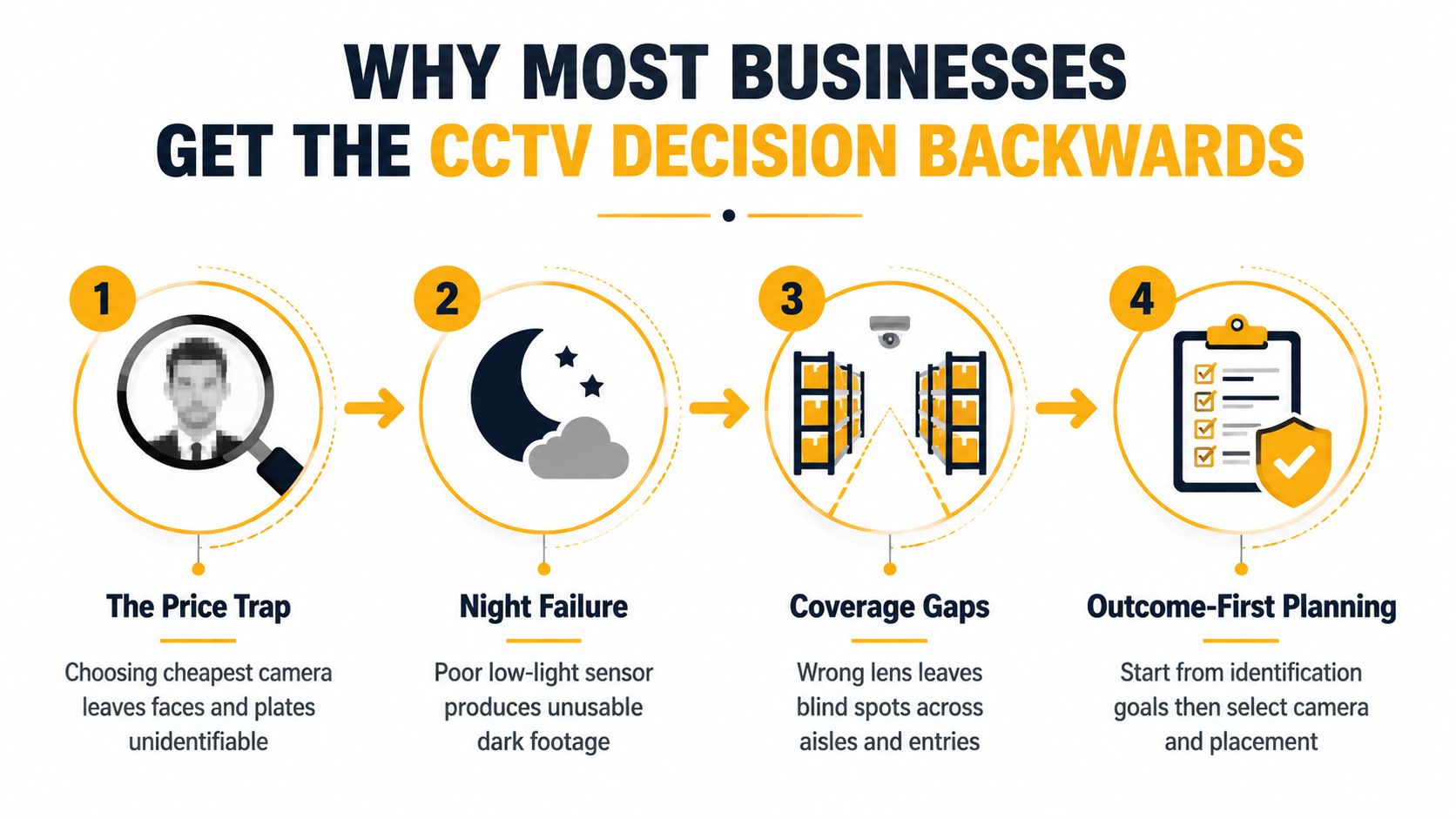
The manager in that warehouse may have bought a camera that was perfectly adequate on a showroom wall. On site, the entrance faced afternoon glare, the aisle needed identification at a distance, and the night scene contained mixed lighting from roller doors, floodlights, and vehicle headlights. A wide lens showed the whole area, but faces occupied too few pixels to be useful.
The better question isn't “Which camera has the highest resolution?” It's “What must this camera deliver when an incident is reviewed?” At a till, that may mean a stable view of hands, transactions, and faces. At a loading dock, it may mean vehicle movement, staff safety, and activity around doors. At a car park, it may mean a controlled view of a vehicle entry rather than a broad image of empty asphalt.
Start with the incident, not the catalogue
Australian adoption has moved well beyond experimental use. A 2005 national survey found that 61 local government authorities, or 9.1% of councils, had some type of CCTV system, while the Australian Institute of Criminology reported that this had risen to 57% of councils by 2014, with another 12% planning installations (Australian Institute of Criminology council CCTV survey). That shift matters to commercial buyers because CCTV is now part of ordinary operational infrastructure, not a novelty that can be specified casually.
A useful design sequence is:
- Define the scene: Identify whether the objective is detection, recognition, identification, or evidence of a process.
- Measure the view: Record distances, mounting heights, lighting changes, reflective surfaces, and likely obstructions.
- Set the operating rules: Decide retention, access roles, export procedures, and incident holds before commissioning.
- Select the equipment: Choose lens, sensor, recorder, network, and analytics only after the first three decisions.
Practical rule: A camera that records an event without preserving usable detail has met the recording requirement, but failed the security requirement.
The same logic applies when CCTV sits alongside alarms, access control, or fire protection. A commercial security alarm system can alert people to an event, but the camera design still determines whether the business can understand and document what happened. Treat the footage as governed evidence, not as an unlimited video archive.
Analogue Versus IP Commercial CCTV Cameras
Analogue systems still have a legitimate place in Queensland upgrades. HD-TVI, HD-CVI, and AHD send high-definition video over coaxial cable, so a site with sound existing cabling may avoid the labour of replacing every run. That can make analogue sensible for a small premises where the existing pathway is reliable, the distances are understood, and the business doesn't need advanced network analytics.
The limitation is flexibility. An analogue camera generally returns video to a DVR through a dedicated coaxial path, while an IP camera is a network device that can use Power over Ethernet, multiple streams, analytics, and more granular remote management. IP systems also demand better planning. A 4MP IP camera at 15 frames per second can produce roughly 4 to 6 Mbps per stream, while a 2MP analogue channel may sit at about 4 Mbps, depending on configuration and scene complexity. Those figures are practical design examples, not guarantees, so the installer should confirm the selected camera's actual bitrate.
What changes in an IP design
Resolution is only one part of the result. A 4MP image with poor lighting, excessive compression, or a badly chosen lens can be less useful than a lower-resolution camera correctly aimed at a controlled scene.
Frame rate should follow the activity. Real-time viewing suits entrances, vehicle movement, and fast interactions. General observation may work at 6 to 12 frames per second, but the correct setting depends on the speed of the event and the identification objective. H.265 can reduce storage and bandwidth compared with less efficient configurations, while H.264+ may be useful in systems that support it. Multi-streaming can provide a higher-quality recording stream and a lighter live-view stream, but both paths need testing under load.
| Factor | Analogue, HD-TVI / CVI / AHD | IP, network |
|---|---|---|
| Cabling | Reuses suitable coaxial runs | Uses Ethernet, fibre, or approved network pathways |
| Recording | DVR-based | NVR or VMS-based |
| Expansion | Limited by recorder channels and coaxial routes | Flexible, but constrained by switching, bandwidth, and addressing |
| Power | Usually separate power path | PoE can carry power and data on one Ethernet run |
| Analytics | More limited and recorder-dependent | Broad support for analytics, metadata, and multi-streaming |
| Upgrade case | Strong where legacy coax is sound and scope is modest | Strong for new builds, multi-site systems, and governed remote access |
| Main trade-off | Less network flexibility | More cyber, storage, and network responsibility |
An analogue upgrade still makes commercial sense when replacing cabling would disrupt trading, the existing coax is tested, and the required views are straightforward. It makes less sense when the business wants centralised management, network segmentation, remote health monitoring, or analytics across multiple sites.
Choosing Lenses, Field of View, and Low Light Performance
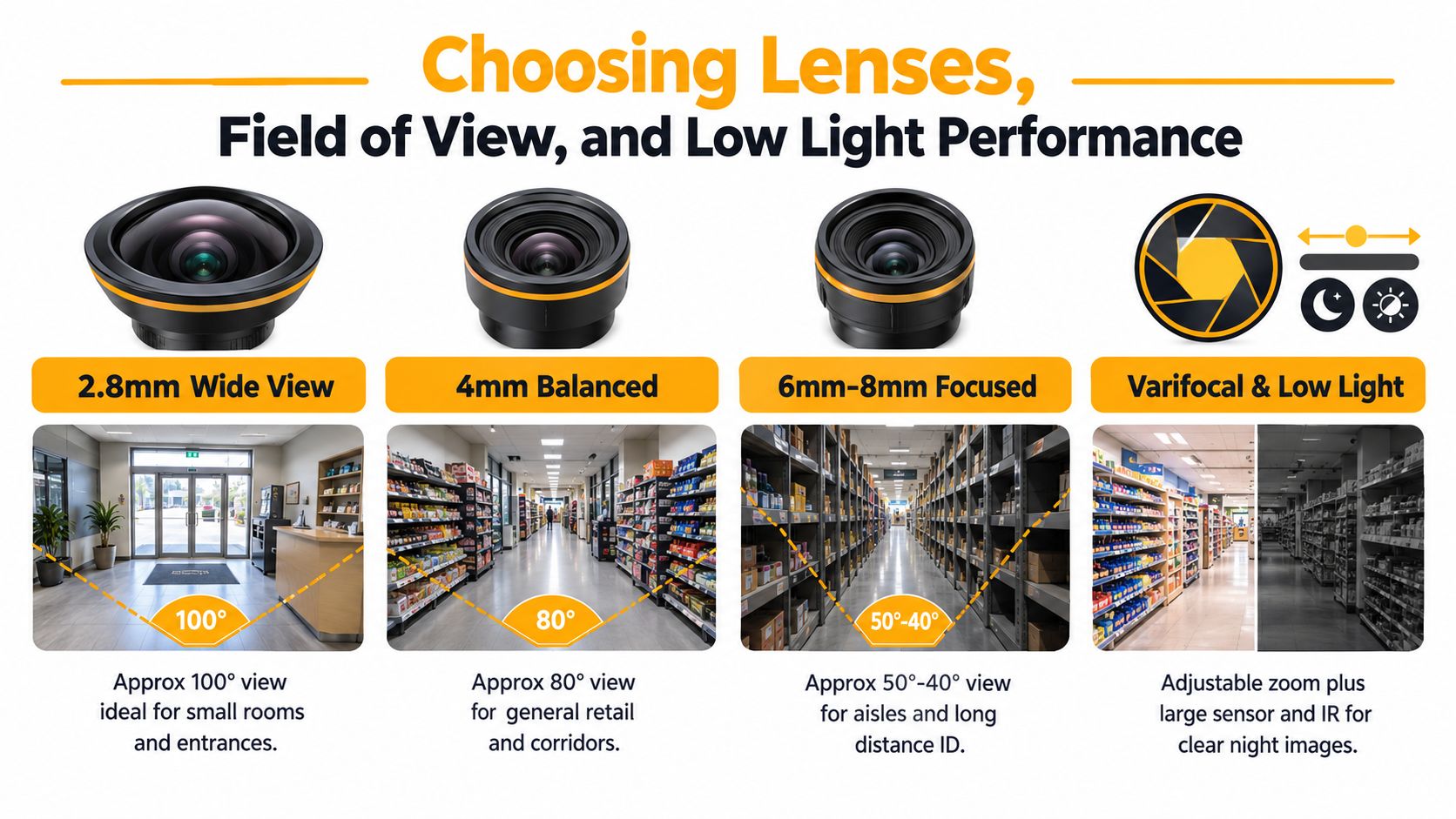
A lens decides what the sensor sees, while the scene decides whether that view is useful. A 2.8 mm lens may suit a small retail floor or entrance because it covers a broad area. An 8 mm lens narrows the view and can be more appropriate for a car park entry where a plate or face must be resolved across 25 metres. Putting the wide lens in the long-distance position usually creates a pleasing overview and poor identification.
Fixed lenses are economical when the mounting position and scene are stable. Common focal lengths include 2.8 mm, 4 mm, 6 mm, and 8 mm, but the number alone doesn't predict coverage because sensor size also affects the field of view. A varifocal lens allows the installer to adjust the framing during commissioning. A motorised zoom adds remote adjustment, which can help at difficult heights, but it also adds cost and another component that needs support.
Match the sensor to the worst light
Measure the scene at night, not only during a bright Queensland afternoon. IR illumination can help in darkness, but the published range must be considered alongside mounting height, target distance, reflective surfaces, and whether the subject moves through the edge of the beam. A Starlight sensor with 0.001 lux sensitivity can preserve colour in very low light when suitable ambient lighting exists, but it won't replace careful positioning.
True WDR matters at entrances where daylight sits behind a person. Without it, the doorway may be correctly exposed while the person becomes a dark outline, or the interior may be visible while the outside is completely blown out. A colour-at-night camera can provide stronger evidentiary detail than a black-and-white IR image where coloured clothing, vehicles, or signage matter, although visible supplemental lighting can affect privacy and neighbour concerns.
A PTZ is a specialist tool, not a blanket replacement for fixed cameras. It can investigate a large yard or car park, but it only records the direction in which it is looking at that moment. Entrances, tills, and other fixed evidence zones need continuous fixed coverage.
Storage, Recording Modes, and Retention Rules in Australia
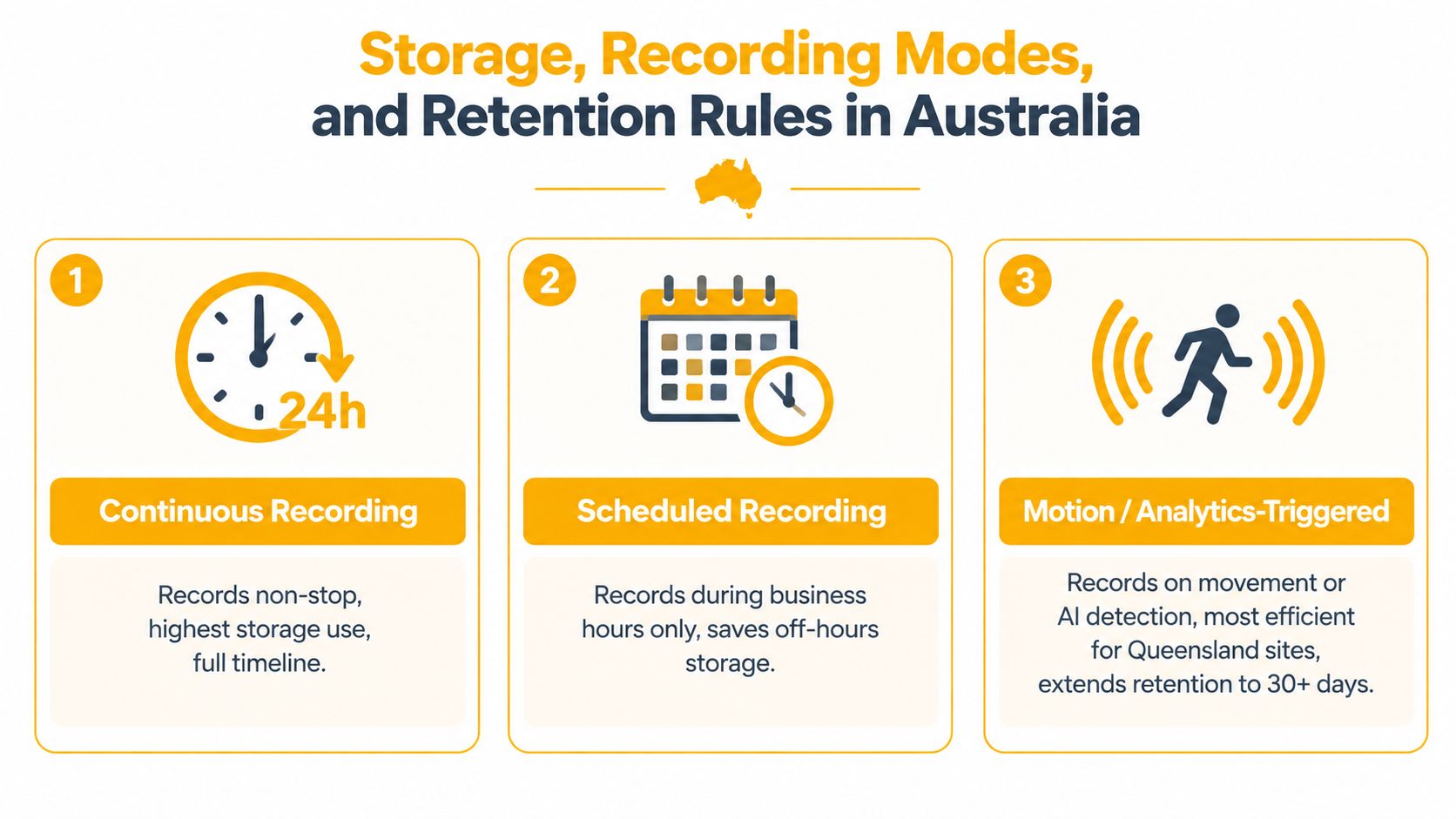
Storage design starts with recording behaviour. Continuous recording gives a complete timeline but uses the most storage. Scheduled recording suits areas that operate at defined times. Motion or analytics-triggered recording can extend the available retention period, provided detection is configured carefully and the business accepts that events may begin outside the trigger window.
A single 4MP IP camera at 15 frames per second in H.265 uses roughly 4 to 6 GB per day, according to the deployment assumptions in this guide. A 16-camera site running 30 days of retention needs around 2.5 TB of usable storage before additional RAID overhead, using those same assumptions. The actual requirement changes with scene movement, bitrate, frame rate, codec, audio settings, and whether the recorder stores more than one stream.
Retention needs a written rule
Queensland State Archives guidance recommends retaining CCTV images for 31 days, while UTAS specification guidance sizes storage for 1080p streams at 3 IPS when idle and 12.5 IPS on motion, with a minimum 20% storage overhead (Queensland and UTAS CCTV specification guidance). The lesson is practical. Higher resolution and higher activity need storage and bandwidth planning, otherwise footage can overwrite early or drop frames during playback.
Queensland privacy guidance supports keeping footage only as long as reasonably needed. A business may choose a shorter or longer operational window based on risk, incident patterns, contractual requirements, and sector obligations. A licensed venue must also account for requirements to store footage securely for 28 days minimum, have CCTV checked and certified every 6 months, and retain footage for up to 1 year for incidents (Queensland licensed venue CCTV requirements).
Local NVR or DVR storage avoids constant cloud uploading and usually gives faster playback on a local network. Cloud storage can simplify multi-site access, but it relies on the business internet connection and requires clear answers about hosting, access, retention, and deletion. A hybrid system can keep primary footage locally while sending selected events off site. Whatever model is chosen, incident footage should be exported, access-controlled, and preserved under a documented hold rather than left to ordinary overwrite.
Network Design, Cabling, and Remote Access Done Safely
An IP CCTV system is a networked security system. Treating the network as an afterthought creates two risks at once, unreliable video under load and a larger attack surface than the business intended.
For new Ethernet runs, Cat6 solid-core cabling is a practical baseline for distances up to 100 metres. Fibre is appropriate for inter-building links where distance, electrical separation, or site layout makes copper unsuitable. Passive baluns on legacy coax may solve a cabling problem, but I wouldn't use that approach for critical aisles or evidence points without testing the complete path under the expected load.
Build for power and isolation
PoE budgets need to be calculated from the actual cameras, not from the number of switch ports. A standard PoE camera may fit a conventional switch budget, while infrared illumination, heaters, wipers, PTZ motors, or analytics can push a camera into PoE+ or PoE++ requirements. A midspan can suit a staged upgrade, while a managed PoE switch usually gives better visibility and control in a new installation.
| Site size | Cabling | Switching | Remote access |
|---|---|---|---|
| Small single premises | Tested Cat6 or suitable existing coax | Managed PoE switch or correctly sized DVR path | VPN or controlled vendor relay |
| Medium facility | Cat6 to cameras, fibre where building layout requires it | Managed PoE switches with surveillance VLAN | VPN with role-based accounts and MFA |
| Multi-building or multi-site operation | Cat6 within buildings, fibre between buildings | Centrally documented switching, UPS support, VLANs, health monitoring | Site-to-site VPN or zero-trust tunnel with central access control |
A dedicated surveillance VLAN keeps camera traffic away from staff BYOD traffic and limits the blast radius if a device is compromised. The installer should also document switch ports, camera names, recorder dependencies, firmware status, and failure alerts so a cyber auditor can identify an unexpected device.
Port forwarding is not an acceptable default for business CCTV. Use a VPN, a reputable vendor relay service, or a properly controlled zero-trust tunnel. Change default credentials, use unique passwords, restrict administrator rights, enable MFA where supported, and set a process for firmware updates. A business CCTV installation should leave the facility manager with network documentation, not just a mobile app login.
Privacy, Access Control, and Queensland Compliance Essentials
A commercial CCTV system records people, movement, behaviour, and sometimes vehicle details. Treat that footage as governed business data from the specification stage. Queensland public-sector guidance addresses protection against unauthorised access, modification, disclosure, loss, and misuse, with access controls, audit controls, and encryption for wireless transmission (Queensland Office of the Information Commissioner CCTV privacy guidance).
Start with a defined security purpose, visible notice, and a restricted field of view. Entrances, tills, loading areas, plant rooms, and other high-risk zones may justify coverage. Staff kitchens, toilets, changing spaces, and private break areas should remain outside the frame. Audio recording requires a separate privacy assessment. Leave it disabled unless the business can justify its use and manage the additional risk.
Make access measurable
The Information Privacy Act 2009 and Queensland surveillance rules operate alongside industry-specific obligations. Tell people that recording occurs, explain the purpose in privacy material, handle footage access requests appropriately, and securely delete or destroy recordings once they are no longer needed. The OAIC also expects notification before recording and secure disposal when footage is no longer required.
Licensed venues require tighter controls. Queensland guidance requires secure storage, documented maintenance, and six-monthly checking and certification. Covert capture, audio, gaming areas, adult entertainment settings, and other sensitive environments must be assessed against the rules applying to that licence and operation.
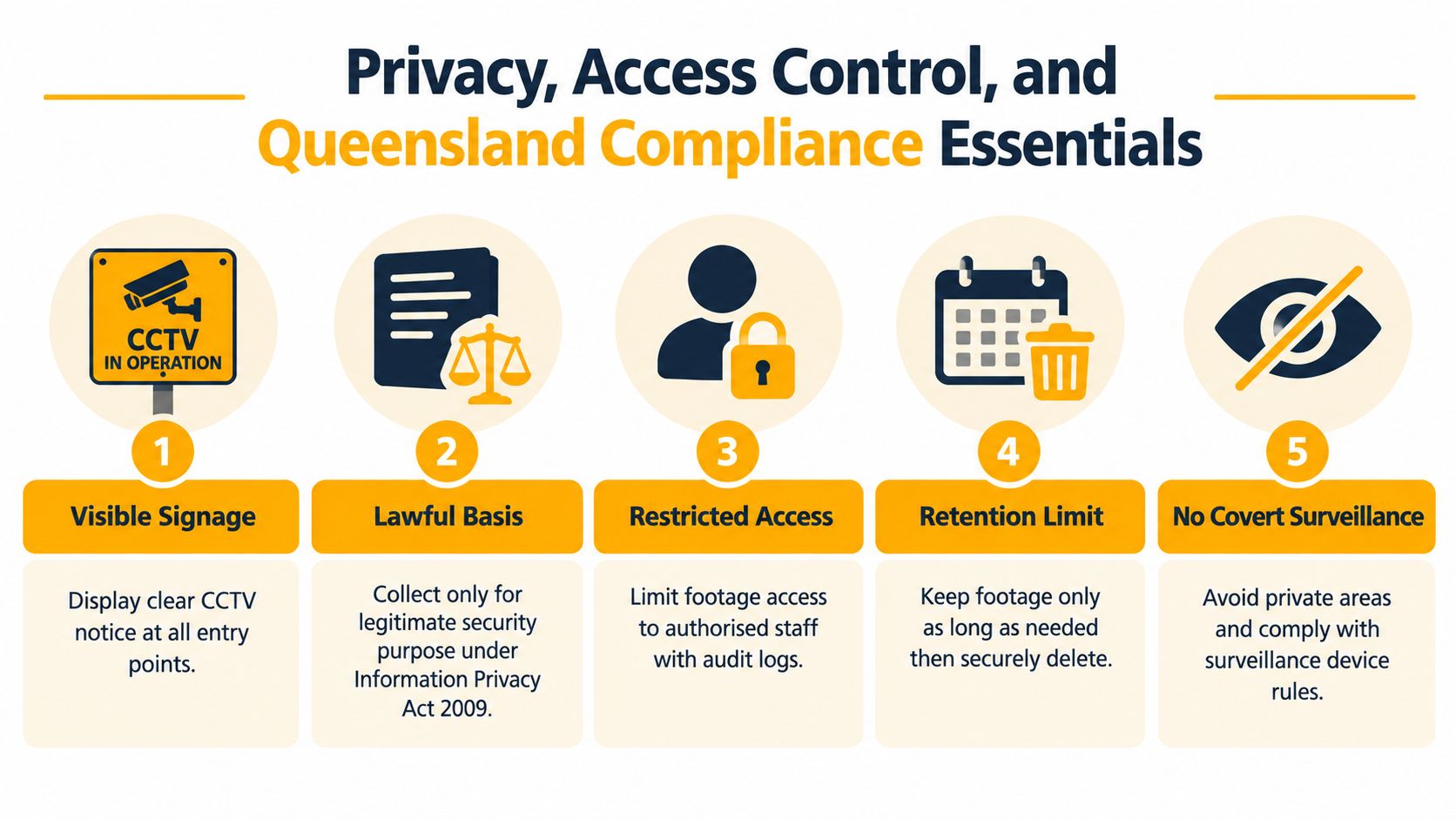
Role-based access connects privacy requirements with daily IT administration. A duty manager may need live viewing without export rights. An investigator may require controlled export access, while system administration stays with a small authorised group. Log viewing and copying activity, apply MFA to administrator accounts, remove former employees promptly, and set expiry dates for contractors' temporary access.
Retention also needs an owner. Define who can place an incident hold, who approves exports, where evidence is stored, and when routine footage is deleted.
A privacy policy states what the business intends. An access log records what actually happened.
Matching the Right Commercial CCTV Camera to Your Site Type
A retail dome and a warehouse yard camera can share a resolution rating while serving completely different jobs. The retail camera needs stable, close-range coverage of people and transactions. The yard camera needs weather resistance, long-distance detail, and enough low-light performance to handle vehicle headlights and uneven illumination.
| Site type | Camera form factor | Typical resolution | Lens / FOV | Low-light and IR | Suggested retention | Compliance notes |
|---|---|---|---|---|---|---|
| Small retail | Fixed dome at entrances and tills | 2MP to 4MP, selected for the scene | Wide fixed lens for shop floor, tighter view at transactions | True WDR at doors, balanced IR indoors | Set by incident and business risk | Signage, staff privacy, controlled export |
| Licensed hospitality | Fixed domes, bullets, and selected PTZ coverage | 4MP or higher where detail requires it | Focused views for cash handling, entries, gaming, and bar areas | Strong WDR and controlled IR for mixed lighting | Account for licensed venue requirements | Six-monthly CCTV checking and certification, secure storage |
| Warehouse and logistics | Varifocal bullets, fixed aisle cameras, PTZ for yards | 4MP to 12MP depending on distance and task | Narrower lens for aisles, longer reach for docks and gates | Low-light sensor, IR matched to target distance | Risk-based, with incident holds | Protect worker privacy and restrict remote access |
| Corporate office | Fixed domes and discreet entry cameras | 2MP to 4MP for ordinary coverage | Wide views for lobbies, controlled views for doors | WDR for glazed entries, moderate IR | Limit to operational need | Avoid private areas, document access roles |
Retail and hospitality
A fixed dome often suits a small shop floor because it provides constant coverage without moving parts. The till should have a dedicated angle that doesn't depend on a PTZ patrol or a wide lens positioned too high. In a pub or club, the design should identify cash handling points, entrances, bars, gaming areas, and incident paths, while respecting licence-specific storage and certification requirements.
Warehouses and offices
Warehouse aisles often benefit from a 4MP varifocal camera with strong low-light performance, because the installer can adjust the framing to the rack layout and working distance. A car park or loading yard may need a focused camera or a PTZ paired with fixed cameras, rather than one wide camera expected to identify every vehicle.
Offices usually need less aggressive coverage. Entry points, reception, server rooms, and valuable equipment may justify cameras, but broad monitoring of ordinary desks can collect more employee information than the security purpose requires. The site type sets the starting point, but the scene and operating rules make the final decision.
Your Pre-Purchase Checklist Before Specifying a System
Before signing a quote, walk the site with the installer and answer these questions in writing:
- Define the evidence: What must each camera identify, and at what distance?
- Check the light: What happens at night, during rain, at sunrise, and when headlights face the lens?
- Select the lens: Is the view wide enough for context but tight enough for useful detail?
- Set recording rules: Which cameras record continuously, on schedule, or by motion and analytics?
- Document retention: How long is footage kept, what triggers an incident hold, and who approves an extension?
- Plan exports: Can authorised staff export a playable file with date, time, camera identity, and audit information?
- Secure the network: Is there a surveillance VLAN, a managed PoE design, UPS support, and a documented remote-access method?
- Remove defaults: Are unique credentials, MFA, firmware updates, and contractor access controls included?
- Confirm privacy: Where will signage go, what areas are excluded, and how will access requests be handled?
- Check licensing: Is the installer appropriately licensed for the work, and are licensed venue obligations included where relevant?
Ask for the camera schedule, floor plan, storage calculation, network diagram, commissioning results, user register, warranty terms, firmware support approach, and maintenance options. A quote that promises “30 days of storage” without stating resolution, frame rate, recording mode, bitrate, or usable capacity doesn't give you a meaningful retention commitment.
The same caution applies to price. A lower quote may exclude privacy signage, network segmentation, recorder redundancy, post-installation documentation, or future firmware support. The commercial CCTV installation cost guide can help frame the discussion, but the comparison should remain between complete systems and comparable obligations, not camera counts alone.
Celtic Fire & Security supplies, installs, configures, tests, and services commercial CCTV and security systems across North Brisbane, Moreton Bay, the Sunshine Coast, Somerset, and Ipswich, with work delivered under its current Queensland security and electrical licences. Visit Celtic Fire & Security to discuss a site survey, a governed CCTV design, and ongoing maintenance covering the cameras, recorder, network access, documentation, and compliance workflow.
No responses yet